Keys and joins
Axiome never asks you to write a JOIN. Instead, administrators declare keys on each model, and the query engine resolves the join path automatically whenever a widget (or Axi) combines fields from several models.
Declaring keys
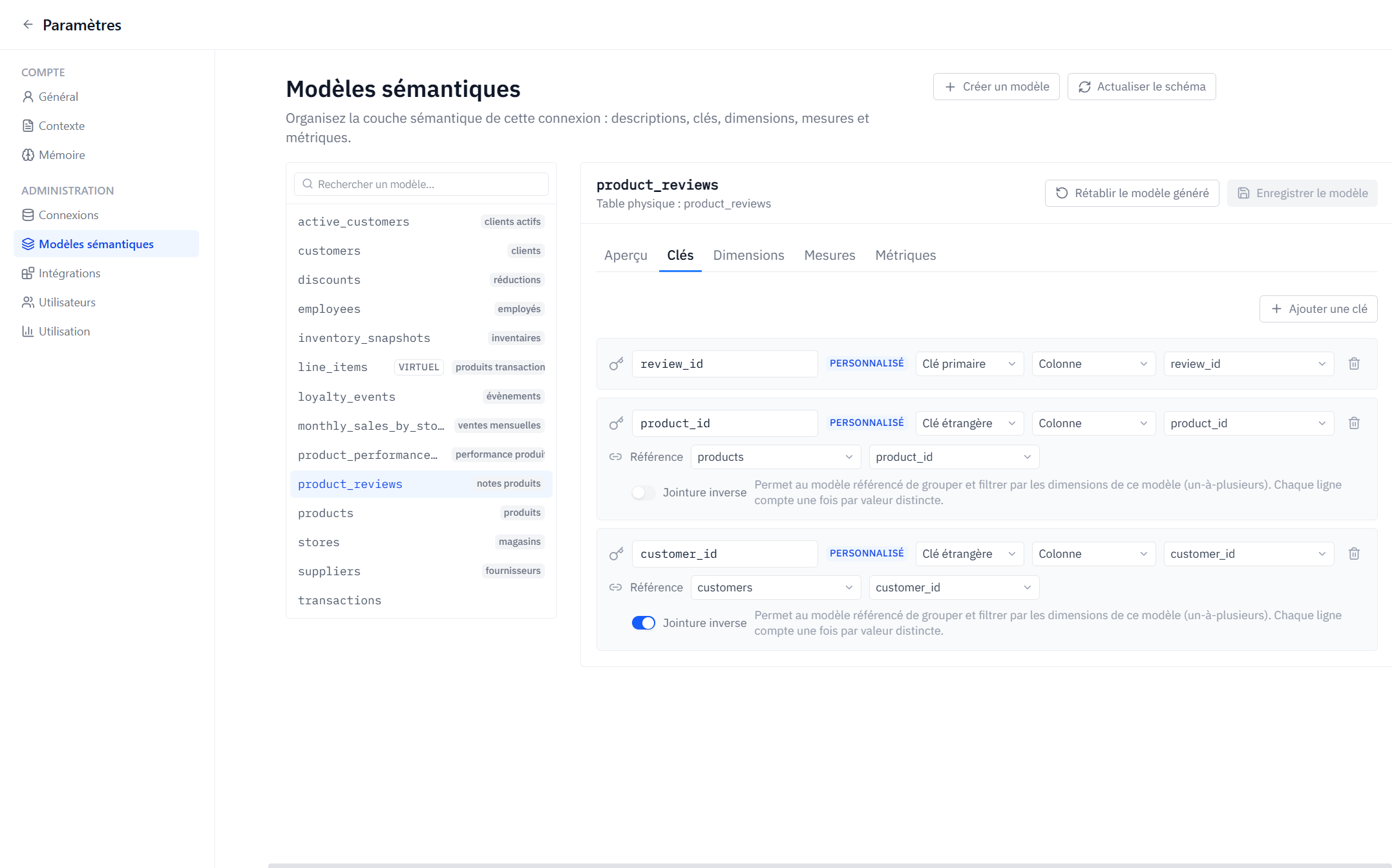
On a model's Keys tab you can add:
- A primary key — the column (or expression) that uniquely identifies a row.
- Foreign keys — columns that reference another model's primary key.
A key's source can be a plain column or a SQL expression. Keys can be hidden if they shouldn't appear as usable fields in editors.
How joins are resolved
When a query mixes fields from different models, Axiome walks the declared keys to find a join path:
- If there is exactly one path, it is used automatically.
- If the models aren't connected, the query is rejected with "These tables aren't connected" — declare the missing key, or pick fields from related models.
- If there is more than one path, the query is rejected as ambiguous — the widget must specify which relationship to use.
Fields that can't be joined to the current selection are shown as not joinable in editors, before you even run anything.
Reverse joins
A foreign key normally lets the many side (e.g. orders) use dimensions of the one side (e.g. customers.country). Enabling Reverse join on a key additionally lets the referenced model group and filter by the referencing model's dimensions — a one-to-many traversal.
Reverse joins are powerful but can multiply rows. Axiome guards the cases that would corrupt results:
- If a measure would be counted multiple times because of the traversal, the query is rejected ("This total would be counted multiple times…") rather than silently returning an inflated number.
- Fields inside nested arrays can't be traversed this way.
Design tips
- Declare primary keys everywhere — several features (like virtual models) rely on them.
- Only enable reverse joins where the one-to-many question genuinely makes sense.
- Hide surrogate/technical keys so they don't clutter field pickers.